FireWire 400 Technical SpecificationsAlways "Wiki" before
you call: FireWire at Wikipedia |
FireWire 400 Connector:
The 6-pin FireWire 400 technology supports serial
I/O at 100, 200, and 400 Mbps and provides
up to 7 watts of power when the computer system is on or
when the power adapter is connected and in sleep mode.
The FireWire 400 connector has six contacts, as shown in
Figure 3-2. The connector pin assignments are shown in
Table 3-2.
Figure 3-2 6-pin FireWire connector: 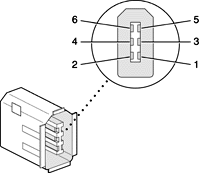
| Table 3-2 Pin assignments on the 6-pin
FireWire connector |
| Pin |
Signal name |
Description |
| 1 |
Power |
Unregulated
DC - 12.8 VDC nominal |
| 2 |
Ground |
Ground return for power and inner cable shield |
| 3 |
TPB- |
Twisted-pair B, differential signals |
| 4 |
TPB+ |
Twisted-pair B, differential signals |
| 5 |
TPA- |
Twisted-pair A, differential signals |
| 6 |
TPA+ |
Twisted-pair A, differential signals |
| Shell |
— |
Outer cable shield |
|
When the computer is on or the power adapter
is connected, the power pin provides a maximum voltage of
12.8 V (no load) and 7 W power per port. Maximum output current
for both ports combined is 1.5 A and is controlled by a self-resetting
fuse.
Pin 2 of the 6-pin FireWire connector is ground for both
power and the inner cable shield. If a 4-pin connector is
used on the other end of the FireWire cable, its shell should
be connected to the wire from pin 2.
The signal pairs are crossed in the cable itself so that
pins 5 and 6 at one end of the cable connect with pins 3
and 4 at the other end. When transmitting, pins 3 and 4 carry
data and pins 5 and 6 carry clock; when receiving, the reverse
is true.
See: Apple FireWire Ports: Specifications
Information and Graphics Above - Copyright © 2007
Apple Inc.
|
Additional Specifications:- Six
wire 4 signal transfer rates Certified for
1394a to 400 Mbps.
- 30-micron gold plated contacts on 2mm centers
- Durability Connections: beyond 1500 cycles, P & P
- Signal Attenuation: <5.8 dB at 400MHz
- Signal Velocity of Propagation: < 5.05 nanosec/m.
- Signal pairs of propagation skew: < 400 p/s
- Crosstalk: < -26 dB
- Cable assemblies in standard lengths: 1 meter, 2 meters, 3 meters and 4.5 meters. Custom lengths from 0.2 meters (6 inches).
- 6 wire = 4 signal (plus ground & power)
- 4 wire = 4 signal (dual twisted pair)
- All Newnex FireWireStuff Cables are compliant with the IEEE 1394-1995-a standards (400 Mbps) and exceed IEEE 1394-b (800 Mbps) specifications.
|
|